
Hands-on fishing
Active Mode
You cast, reel, and manage the line directly.
Beginner handbook · Evidence checked August 17, 2026
Start with the verified game loop, choose Active or Passive play deliberately, and move to focused guides when you need fish, gear, platform, or update detail.
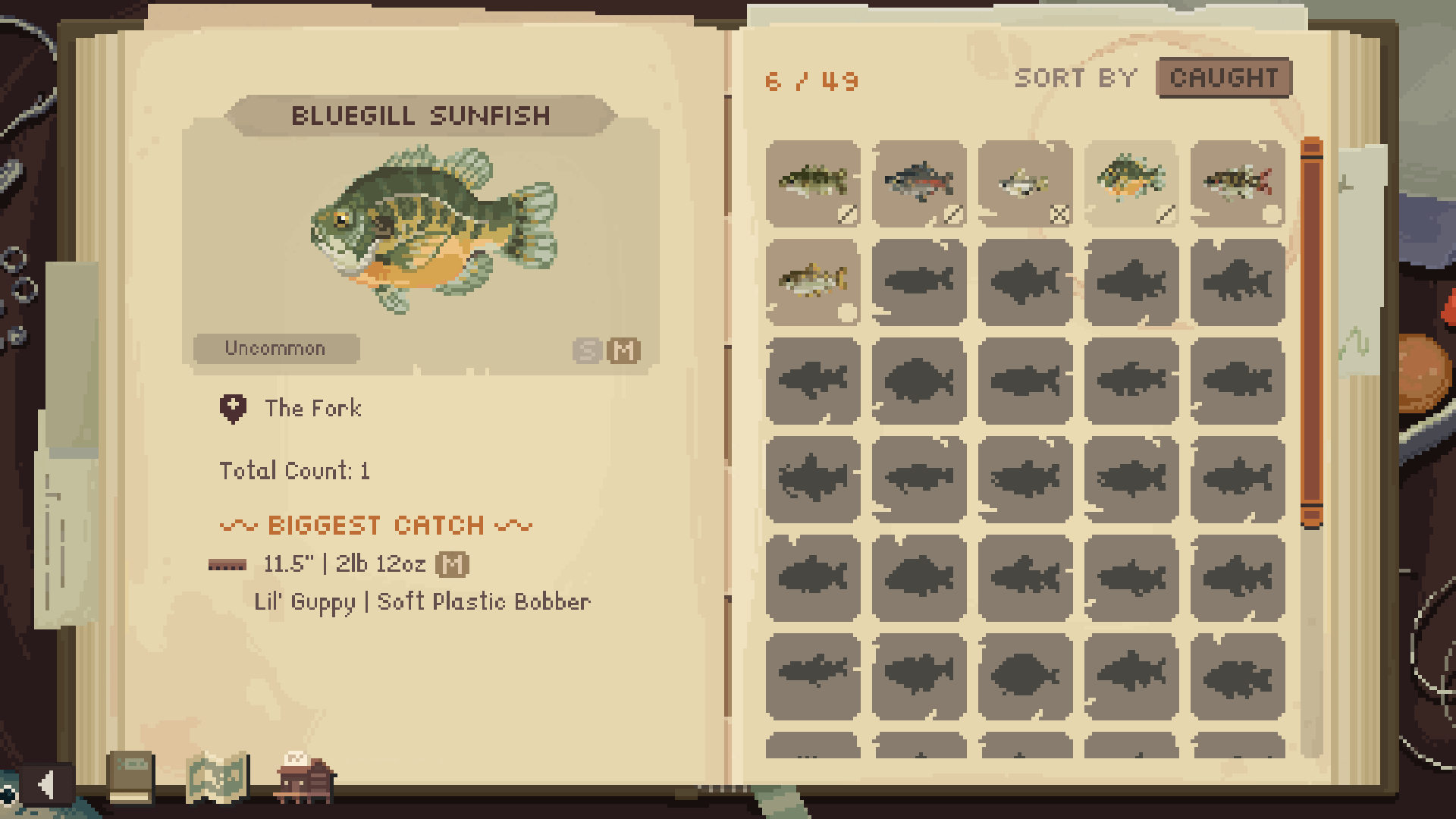
The cast n chill guide starts with a simple verified loop: choose a fishing spot, cast or let Passive Mode handle routine fishing, land catches, and use progression to improve gear and reach more waters. Exact controls, unlock thresholds, and target-specific requirements should be checked in the current game rather than inferred from promotional material.
Immediate answer
Official descriptions establish the broad activity: explore peaceful lakes, rivers, and ocean settings; cast for fish; pursue rare or legendary catches; and upgrade equipment as the collection grows. They also establish two supported approaches, Active Mode and Passive Mode. Those facts are enough to plan a first session, but they do not supply a universal button sequence or a permanent unlock chart for every version.
Begin at a currently available spot and pay attention to the game’s own prompts. In Active Mode, treat the first catches as practice for casting, retrieving, line control, and reacting to pressure. In Passive Mode, choose the location and loadout consciously before lowering attention, because community reports show that result expectations can depend on settings and may change between patches.
After a catch, use the in-game information as the primary record of what happened. A screenshot can preserve the fish, place, size, rod, lure, time, and build context when those fields are visible. That dated record is stronger than a memory, and it prevents one successful setup from being rewritten later as the only possible setup.
Official scope
The official press kit identifies 16 fishing spots, 50 fish, and 16 Legendary Catches in its published scope. The official game and Steam pages also describe gear upgrades, a dog companion, co-op, and active or passive fishing. These numbers and feature labels explain the intended breadth, but they are not permission to publish an undated database or claim that every later update is already represented.
A useful beginner sequence is therefore qualitative rather than numerical: learn the feel of a normal catch, observe how the game presents size and target information, sell or progress when the current interface offers that option, then compare the next available equipment choice with the fish you are trying to reach. The rods page explains why exact prices and statistics remain Not verified until a current-build capture supports them.
Do not treat “rare,” “trophy,” and “legendary” as interchangeable search terms. Official material confirms rare and legendary pursuits, while community questions show that players also reason about trophy signals and logbook marks. The dedicated legendary page keeps those high-risk conditions separate and labels community clues by date rather than turning them into permanent rules.
Choose a pace
Hands-on fishing
You cast, reel, and manage the line directly.
A quieter pace
The game can handle routine fishing while you focus on something else.
OfficialMode descriptions verified August 18, 2026.
Active Mode is the better learning environment when you need to see how a cast, retrieve, line response, or fish fight behaves. It gives direct feedback when a target does not respond to the selected setup. Player footage can illustrate that workflow, but an individual video remains an observation and cannot establish a universal rod, lure, time, or retrieve rule.
Passive Mode is an official lower-attention option, including the kind of second-monitor use described in the press material. It can support routine fishing while another task has your attention. Claims about legendary catches, achievements, or loadout automation conflict across community discussions, so the safe answer is to record the current build and exact settings before treating a passive result as repeatable.
Move from broad to specific
The fish guide teaches how to judge a record, a pictured catch, and a dated community clue. Fish & Locations is the interactive evidence set and currently publishes only three official-screenshot-backed records from The Fork. Legendary Fish concentrates on the official count and the conditions that remain patch-sensitive, while Rods explains the upgrade loop without manufacturing a stat table.
Idle Mode answers setup and expectation questions. Symbols Meaning deliberately refuses to assign meanings to logbook icons without a current screenshot key. Old Moose Cabin handles the feature and pond questions, whereas Fish Finder has its own status page because its unlock conditions, price, range, and detailed behavior were not established by the collected sources.
Platform pages answer availability rather than gameplay. Steam and Nintendo availability have official evidence; PS5, Xbox, and a physical Switch edition do not have official confirmation in this source set. Demo and Roadmap are dated status pages, and the review page offers buyer guidance without pretending that promotional claims are first-hand performance testing.
This cast n chill fish guide explains how to use verified records, location evidence, equipment notes, and dated community clues without inventing catch rules.
Open guideUse cast n chill fish locations to search the verified public dataset, browse represented spots, and see rods, lures, sizes, and unknown fields clearly.
Open guideThe cast n chill legendary fish guide separates official scope from dated player clues for locations, times, tackle, technique, and patch-sensitive respawns.
Open guideThis cast n chill rods guide explains the verified upgrade loop, how to evaluate rod-and-lure evidence, and which exact stats remain Not verified.
Open guideThe cast n chill fish finder page explains what the collected sources do and do not confirm, how it differs from cabin intent, and what remains To be confirmed.
Open guideThis cast n chill idle mode guide explains the official Passive Mode feature, practical setup decisions, and conflicting community claims about rare catches.
Open guideThe cast n chill symbols meaning page identifies what the current sources support, flags unverified logbook icons, and gives a safe screenshot-checking method.
Open guideThe cast n chill old moose cabin guide separates official update evidence from player questions about restoration, the pond, trophies, and Fish Finder details.
Open guideReliable note-taking
For a fish-specific observation, capture the current date, game version when visible, region and spot, fish name, displayed size, rod, lure, time, depth or retrieve behavior, and whether the source is official or player-produced. Leave a field as Not verified when it is absent. A blank supported field is more useful than a plausible value that cannot be traced.
When two community reports conflict, preserve both as dated reports and state what would resolve the disagreement. That may require a current-build test with the same location, loadout, time, and automation settings. The idle and legendary pages use this approach because their community evidence contains direct conflicts rather than a single dependable rule.
Use official pages for product scope, platform availability, dates, and feature vocabulary. Use Steam Community, Reddit, and player videos to discover questions, candidate conditions, and troubleshooting patterns. Community material can guide a test, but it should not silently become an official mechanic or a promise about a future patch.
Beginner FAQ
Use Active Mode when learning casting, retrieve, and line control. Use Passive Mode when you already understand the selected location and loadout and accept that catch-specific limits may need current-build verification.
Start with Fish & Locations for published source-backed rows, then use the Fish Guide to judge any dated community clue. Absence from the small dataset does not mean the fish is absent from the game.
Not from the verified official materials alone. The rods page explains the evidence needed for an exact stat or unlock claim and marks missing values Not verified.
The research contains player questions but no current-build screenshot key for every icon. The Symbols Meaning page explains a safe verification process instead of guessing.
No. Roadmaps are dated planning snapshots. The roadmap page distinguishes released, planned, unclear, and superseded status and compares older entries with newer official announcements.
Official positioning, core play, and listed platforms.
Checked 2026-08-17Developer, release timeline, content scope, modes, upgrades, and co-op context.
Checked 2026-08-17Current store description, PC purchase path, features, requirements, and changing store data.
Checked 2026-08-17Official announcements surfaced through Steam plus player-guide and discussion demand signals.
Checked 2026-08-17Player questions about indicators, crowns, and legendary markers, not an official icon key.
Checked 2026-08-17Auto-captioned player observations about workflow, signals, matching gear, and line control.
Checked 2026-08-17